Search

Showing posts with label photoshop. Show all posts

Wednesday, November 14, 2007

Cross Process Lightroom plugin / Preset

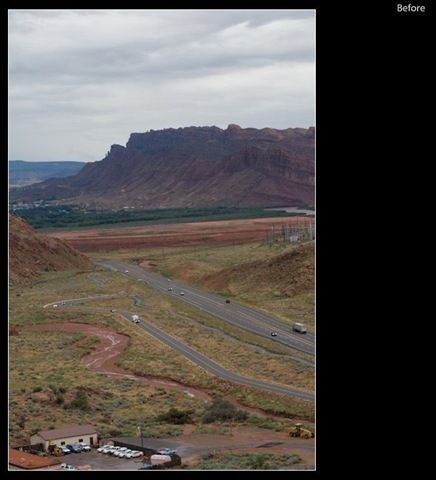
cross_process_experiment_before

Before

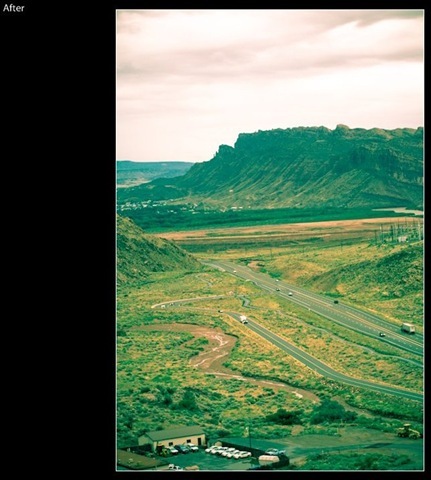
cross_process_experiment_after

After

This is a preset for Adobe Lightroom available for download at at Lightrooms Killer tips  website

Its gives a cool effect to some pictures. It tends to apply a green tint so be selective in where u use them. You might find that some otherwise boring photos will get a new life with this preset. Here is one such attempt from me. This was taken at the Arches National Park, MOAB,Utah.

Sunday, November 11, 2007

Lucis Look with Lightroom - Adobe Lightroom tips

Originally found in DP Review Forums link: http://forums.dpreview.com/forums/readflat.asp?forum=1014&thread=25577665

You can see several samples of this effect in the forum post.

Settings suggested by user :FredJamesPhotography
Slide exposure , recovery , Fill Light ,Contrast ,Clarity, Vibrance to 100

Then adjust until u get the colors you desire. I like to keep the colors low

Then blacks and exposure to get a pleasing appearence

Try this out and see if you find it interesting.

Thursday, November 8, 2007

Adobe Light Room Tip - Edgy Effect

If you use Adobe Lightroom - A new and useful photographic workflow tool from Adobe, you should try this cool effect. This is by mattk from lightroomkillertips.com
This effect can be useful for Street or Urban type of photography. he does a lot of fast adjustments to various settings like recovery, filllight, contrast etc. Luckily there is a detailed instructional video of about 10 MB. You may have to watch the video twice or thrice to get the idea

here is the link http://www.lightroomkillertips.com/2007/video-surreal-edgy-effect/