Search

Wednesday, August 5, 2009

Flickr Explore – some interestingness thoughts on how to get your photos to explore page

Flickr uses an algorithm  to choose the best 500 photos every day and these photos are posted on post them on Flickr Explore page. This algorithm goes by the name “interestingness”.

according to flickr - "There are lots of things that make a photo 'interesting' (or not) in the Flickr. Where the clickthroughs are coming from; who comments on it and when; who marks it as a favorite; its tags and many more things which are constantly changing. Interestingness changes over time, as more and more fantastic photos and stories are added to Flickr."

1) The easiest (most obvious) way to get into flickr explore is to shoot an excellent photo. or at least one that others think is interesting to them.

2) Getting more people to comment or tag the picture as favorite will really help.

3) to get more people to comment on your photos may take a while especially if you are starting off with flickr, but you can speed up this by adding your best photos first.

4) actively participate in forums(groups), discussions get people to discuss on you photos.

5) personally i dont like the comments that embed pictures in them… but you will find a lot of them in several groups. its something you have to live with if you are really interested in getting comments.

6) Get a bunch of flickr folks to regularly visit your photos by giving positive remarks and marking their photos are favorites. Its easier If you have a bunch of friends who are actively in flickr, otherwise try inviting them. All this would improve your chances of getting to explore.

Unfortunately flickr does not notify you in any way  if your photos are featured in explore (other than the attention it suddenly gets). To check if your photos are on explore, you can goto the free service http://bighugelabs.com/flickr/dna.php?username=77469973@N00    You just need to replace the username with yours and you can see a lot of statistics on you flickr account, including the list of photos that were featured in explore.

So far only 6 of my images have been in Explore and the highest position ever taken is # 34 (i still hold that). Below is a slide show of those images.

Some more links worth a click.

Tuesday, August 4, 2009

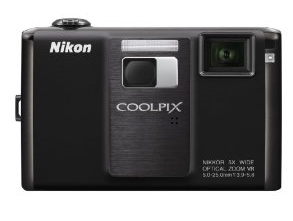
Nikon S1000pj - World's first camera with projector

Nikon pushed innovation to new heights today by introducing a brand new product category in Digital Cameras. The S1000pj includes a digital projector to show off your photos. The projector itself is rated at 10 lumens and in a dark room will produce reasonably sharp projections of photos or movies clips on any flat surface at up to 40 inches in size.

image   image

Other Major Features

  • 5 image stabilizing features
  • High ISO 3200 and 6400 at 3 megapixels (reducing the image size should help in keeping high iso noise in check)
  • Quick In camera retouch
  • 5x zoom NIKKOR lens (reasonable zoom range to have)
  • wide angle focal length of 28mm (good to have for landscape work)
  • 12.1 mega pixels (a bit too much for a small sensor)

Video

See it in action here

Price and Availability

Available for pre order from amazon

Press Release

Nikon Corporation is pleased to announce the introduction of the COOLPIX S1000pj. Packing the pleasure of a personal go-anywhere theater into a stylish compact enclosure, the COOLPIX S1000pj delivers a fun new way to share pictures with friends and family in most any location.

The COOLPIX S1000pj is the first compact digital camera* in the world to feature a built-in projector. With a simple touch of a button, the camera projects favorite photos or movies clips on any flat surface at up to 40 inches in size. Pictures can be projected individually, or as slide shows complete with music and added effects that enhance the experience. It's the fun new way to share pictures with family and friends in most any location.

This capability to project still images or movie clips gives birth to an entirely new form of communication as all participants visually share the passion of special moments together. For example, the COOLPIX S1000pj can be used to capture photos on a family vacation, and then serve double-duty as a personal theater in the evening as everyone enjoys viewing the highlights of the day projected on a wall or a ceiling. Whenever and just about wherever friends gather, the COOLPIX S1000pj's projector can add whole new life to the party by displaying nostalgic pictures or freshly shot images for all to enjoy. Parents can even use the COOLPIX S1000pj to display photos of their own artworks or other images on the ceiling to complement bedtime stories they tell their children.

A handy projector stand is included, as is a remote control that can be used to operate the projector, release the shutter, and more.

Also featured are the precision optics of a 5x zoom NIKKOR lens that provides the compositional freedom of 28mm wide-angle coverage and macro shooting ability from as close as 3 cm (1.2 in.). This combines with the image quality and performance benefits of Nikon's innovative EXPEED digital image-processing concept to help ensure consistently beautiful results produced at the high resolution of 12.1 effective megapixels.

The COOLPIX S1000pj will be available in Black or Warm Silver. (Color name and color availability may vary according to region.)

Source: nikon usa site, youtube.com

Sunday, August 2, 2009

Essential Free Software tools for The Digital Photographer

    This is a list of software (Mostly free)  that i have found useful in my digital workflow. If you don't see your favorite program here, please drop a comment and i would love to try that one out. Photoshop and Lightroom are not free but i have given the nearest free alternatives that I use.


  1. Gimp / Photoshop -  Gimp or Photoshop allows us to adjust the exposure settings, create HDRs Panoramas, work with layers etc. Gimp is free and is good enough for most purposes while Photoshop will cost a lot and has a few more options to play with.

  2. Picasa / Adobe Lightroom – Picasa is a good free photo organizer and viewer for viewing your collection from Google. Lightroom is an expensive offering from Adobe and is a complete photo workflow including integration with Photoshop. However it does not have all the layers and advanced features of Photoshop, but is great to work with a batch of images

  3. Irfran view – Irfran view is a great photo viewer (Free) and has some basic editing features as well. It supports a wide range of formats and the best feature I see is the batch processing. If you want to quicky resize 1000 photos and or rename them, adjust some parameters like sharpness while you do that, I have not seen a better tool than irfran view to do that.

  4. Microsoft Synctoy 2.0 – This is a great little free tool from Microsoft that allows you to take backups of you photos/documents. It can be scheduled and you have a lot of options to customize your backup

  5. Microsoft Live Writer (Photo Bloggers) – If you blog then this is a wonderful free tool from microsoft that works with most Online blogging services

  6. A Flickr Account and Flickr Uploadr – The best social network for photographers. If you are new to photography, the you must join for a free account. Flickt uploadr is a free tool that lets you add images to flickr.

  7. Twitter – I post the photo links on twitter whenever i upload photos or blog articles. this will help my friends who are not on flickr to follow me

  8. more to be added……